Valuable Tips on How to Reduce Expense Fraud
/in expense management, expense reporting, Fraud, T&E data/by demoAs a company, if you’re not worried about expense fraud–then you should be. In fact, according to a study conducted by the Association of Certified Fraud Examiners, expense reimbursement fraud makes up 15 percent of business fraud. Because of this, businesses suffer an average loss of $26,000 every year.
To make things worse, it takes around 24 months for any of the fraud to be detected. Therefore, before the problem and perpetrator are pinpointed, much of the company’s money has been used up for fraudulent purposes already.
Employees who commit expense fraud often say that they add additional expenses in their reports as a way to “even out” their previous reports. They may have forgotten to input some expenses previously and are making up for them now. It becomes a guessing game of inaccuracies and unaccounted adjustments. In the long run, this can unnecessarily cost the company a lot.
So how do you remedy this?
Remedy Expense Report Fraud by Taking These Steps
Let’s take a look at how companies can reduce expense fraud.
- Track expenses much easier by requiring your employees to create one expense report per trip. Require them also to submit it as soon as they get back.
- Make the most of every transaction and even get perks by getting your frequent travelers corporate credit cards. These can also allow you to more transparency for every transaction and get immediate credit for canceled ones.
- Charge future-dated travel to a corporate charge card.
- Establish a policy that requires most senior employees at a meal to pay the check. This helps avoid fraud, redundancy, and duplicate transactions.
- Employees who submit hard-copy receipts and manually filled spreadsheets are more likely to commit fraud. Avoid this by creating steps to automate the expense reporting process.
- Centralize travel expense processes for better management and visibility.
- Validate expenses against corporate policy. This helps deter and prevent employees from entering a non-compliant expense. At the least, it creates a system that allows them to explain the charge for quick review and approval
- Implement a solution that can automatically identify and flag different kinds of expense fraud.
Don’t Rely on Band-Aid Solutions for Expense Fraud
Remedying expense fraud doesn’t have to be tedious and time-consuming. Worrying about compliance should not give finance such a hard time that inefficiencies happen. Trying to police each and every expense item should not be done at the expense of company productivity. That’s why many automated solutions should be in place.
Gorilla Expense provides a comprehensive expense reporting solution that allows you to automate expense reports.
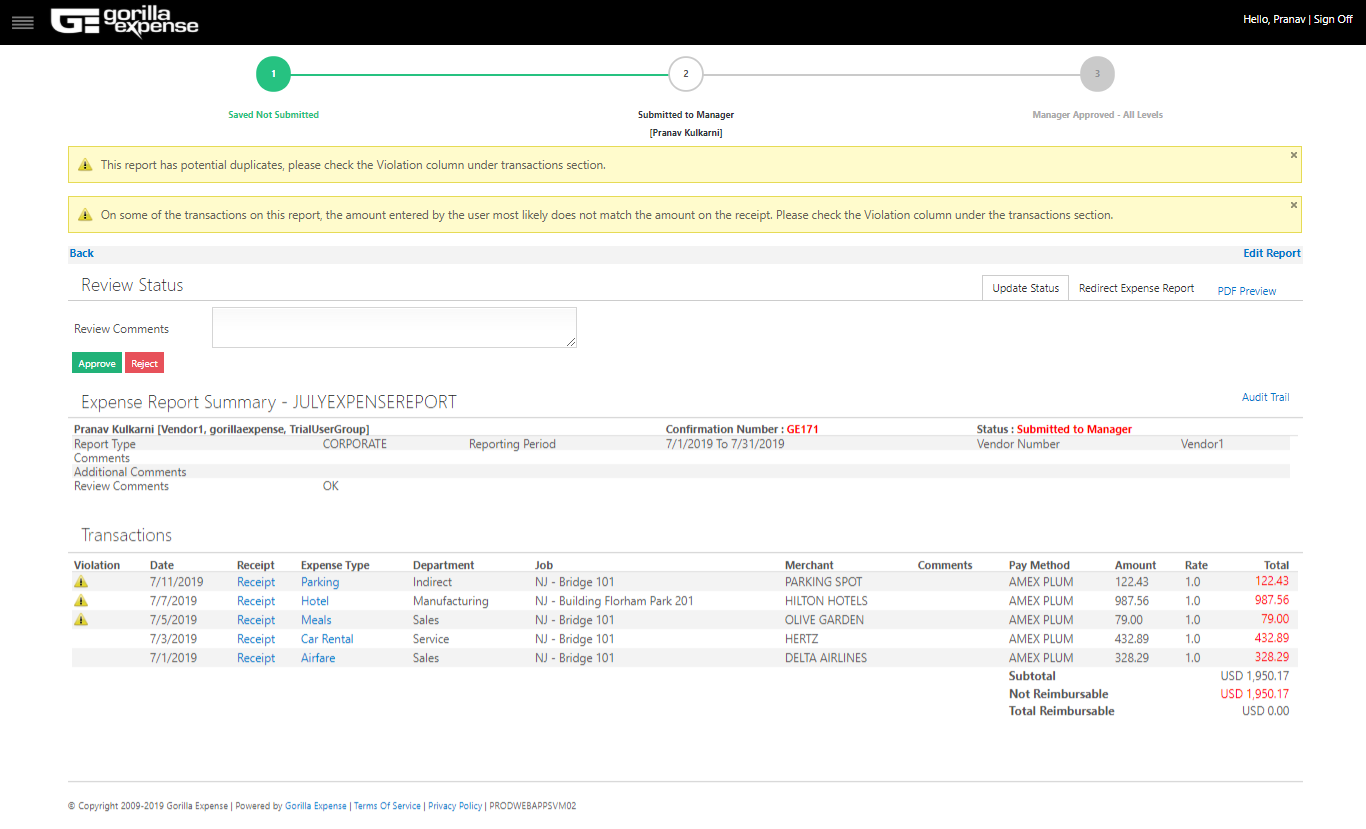
Gorilla Expense, for example, will identify any duplicate transaction the user may have entered by searching for similar transactions across the system. With our Receipt Scan solution, we also flag transactions on which the amount does not match the amount shown on the receipt automatically. The screenshot below shows how the system flags duplicates and transactions where receipt amount does not match the amount entered by the user.

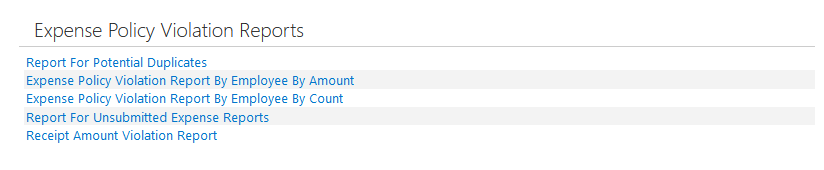
In addition, our “Expense Policy Violation Reports” section will show you the top expense policy violaters in the company and also detail each violation.
With Gorilla Expense in place, you can be on top of all your expenses with better visibility, better compliance, significantly less fraudulent expenses, and much more peace of mind. At the same time, employees can find it easier to comply and submit expense reports. This helps get all the pain and hassle out of the way.
Find out how you can get Gorilla Expense for your company by contacting us today.
7 Pain Points of an Inefficient Expense Management System
/in expense management, expense reporting/by demoEmployee travel and expense management can be complex and time-consuming. If the system is slow and inefficient, as well as fraught with errors, it’s not an ideal situation. In fact, far from it. There are many disadvantages to ineffective expense management that can cost both the employees and the company in the long run. Read more
Expense Management Best Practices For Employees
/in expense management, expense reporting, T&E data/by demoIn today’s constantly changing corporate landscape, you may be required to travel by your company, whether locally or abroad. This could be due to a variety of reasons, such as meetings, courtesy calls, business development, or project execution, to name a few.
Whatever it is, for every employee who travels for the company, the company incurs costs that could easily add up if you look at the bigger picture. This is why these companies have travel guidelines and protocols in place, especially when employee reimbursements are involved.
Get to Know Your Company’s Travel Expense Policies
Companies of all sizes have expense policies that guide their employees in their travel and expenses for the business. There may be times that you yourself may have been told off regarding a reimbursement, that it is not claimable. You may even have disputed some claims along the way.
The thing is, there’s actually quite a number of guesswork, confusion, and frustration when it comes to misunderstanding these expense policies. This could be due to the system itself, a conflict with the policies, or you may have provided insufficient data to back your claims.
While every company has expense management systems in place, having a dated one can also affect the turnaround time for reimbursements. In the long run, the delays could cost the company.
Follow These Do’s and Don’ts
Whatever system you have in your organization, as an employee, it’s important to know what your privileges and limitations are.
To help you out, here are some Dos and Don’ts for employees when it comes to business travel and expense claims.
DOs:
- Familiarize yourself with your company’s expense policies
- Save your expense receipts and keep them organized in one place
- Keep a copy of your expenses or receipts at all times, whether as a photocopy or on your phone, if in case you lose your actual paper receipts
- Submit your expense report as soon as you incur your expense
DON’Ts:
- Don’t ask for reimbursements for personal services or expenses that you may have incurred during your business travel
- Avoid overspending for things or situations that don’t warrant it while you’re on your business trip. If you’re not being conscious of your company’s funds or budget, this will be found out sooner or later
- Don’t hold your expense reports and reimbursement claims for a long time and submit them weeks or months later
Go Digital and Paperless!
These days, there are many expense management solutions that leverage on the latest technology to give you and your company the best features. Just like Gorilla Expense!
With Gorilla Expense, your expense management system will be seamlessly upgraded to address your organization’s needs. Using the latest technology, it makes it easier for company employees like you to keep track of expenses, store receipts, submit claims, and track approvals–all within one app. Whether cloud-based or in-premise, you can be sure that Gorilla Expense takes the hassle off expense reporting to ensure you get your reimbursements–minus all the frustration.
You can even use Gorilla Expense while on-the-go, without having to look for a PC or lugging around your laptop with you. Right within your smartphones, you can use the app to help you be on the move while ensuring that your expenses are tracked.
So, if you feel that your company could use the ease and speed of having an automated, paperless, and intuitive expense management solution such as Gorilla Expense, get in touch with us.
Expense Reporting Best Practices Using Microsoft Dynamics SL
/in expense management, expense reporting, Microsofy Dynamics SL/by demoProject-driven businesses face many unique challenges. From different rates to multiple contractors, from client-specific considerations to simply meeting deadlines, it’s important for these organizations to get all the help they can get. This is especially true in one area of finance that even product-based businesses have a difficult time–and that is expense reporting. While many […]
Shopping for a T&E Expense Reporting Software? Here are the Must-Haves
/in Credit Card, Dynamics 365 Business Central, expense management, expense reporting, Microsoft Dynamics GP, Microsoft Dynamics NAV, Microsofy Dynamics SL, Mobile/by demoThere is always room for improvement when it comes to anything, and so, you’re probably reading this because you want to improve the current expense management system and processes you have.
So before shopping and procuring an expense management software, you have to look at the specific requirements of your organization. What does the day to day operations look like from an expense standpoint? Is the software going to scale and adapt to your needs? Do you deal with international travel and booking that needs to be addressed? Does your business use corporate credit cards?
Now that you have figured out your unique requirements, you have a better idea of what to look for to make your expense management so much more efficient. Take a look at these expense management software must-haves:
- Corporate credit card integration. This avoids corporate credit card expenses from slipping through the cracks, which can cost the company a lot in the long run. The software should be able to automatically import corporate card expenses and provide to the user for reconciliation.
- Mobile apps for Real-time tracking. Today’s technology makes it easy to capture receipts with just a click of a smartphone camera. This should be a standard feature of your software, in addition to easy mileage tracking using maps. If there is OCR in the mobile app, that would be a bonus!
- Real-time reporting. Time is money, and reports should be easy to create and submit without any delay. The software must be able to organize reports while providing a clear picture of T&E spend, which helps with improved visibility for the organization.
- Timely reimbursements. Reimbursements must occur in a timely manner, and automation plays a big part in this. The software should be able to support reimbursements either via payroll or through the ERP/Accounting system. It also helps to have automatic notifications and reminders for employees to submit their receipts to move things along.
- Easy Accounting system integration. The software must seamlessly integrate with Microsoft Dynamics ERP so that all the data can be automatically pushed into Dynamics and reconciled. This also avoids manual work, duplications and redundancy, while making the finance team’s lives much more efficient.
- Customer support. You should be able to easily implement your system, with solid adoption amongst your employees. If there are any issues, the software vendor must be able to address these promptly and thoroughly.
As you can see, there is not really one perfect solution that it comes down to. The best solution out there is really the one that works best for your company and your needs.
It is also important to understand how the expense management solution can configured to fit your organization. And there is where Gorilla Expense comes in. Gorilla Expense can accommodate various expense management needs, and we specialize in integrating the data into Microsoft Dynamics ERP. We work with various customers across the world and across myriad industries.
If you would like to see a live demo of the solution or have any questions, please contact us at sales@gorillaexpense.com
The Grand Vision: 100% AP Automation
/in Compliance, expense management, expense reporting, Industry reports, Innovation, Next Generation, System Integration/by adminThe recent economic downturn, difficult credit situation, and increasing costs have all arrived together. For many companies, this has forced them to take a closer look at their internal processes as they seek ways to cut costs, improve efficiencies and increase bottom lines.
One area we are seeing a lot of interest in is Accounts Payable (AP) automation, with many companies striving to make it 100% automation.
100%-AP-Automation
For these companies, cutting costs associated with the AP process, automating it, making it less time consuming and providing panoramic visibility to decision makers in Finance is a no-brainer. Take the example of Zappos – restructuring their financial processes reduced their month-end closing process by 10 days. For a $1Billion company, that is huge!
So what are some of the key areas that CFOs, Controllers, AP Managers, Purchasing Managers are looking to improve their internal processes with relative ease while contributing to the organization’s overall mission to streamline costs?
Automation is the key to efficiency (and success)
Consider the inefficiencies in a non-automated, manual, paper-based process:
- An Aberdeen Group study found that it can take anywhere from 3.5 to 15 days to process a single invoice. (The industry average for 50% of companies is 11 days to process a single invoice. Yikes!). The cost of processing can range from $5 to $25 for a single invoice
- On the T&E expense report side of things, another Aberdeen report found that it can take anywhere from 3 to 22 days to reconcile and reimburse a expense report. The cost of processing an expense report manually is $35.28 versus $10.75 for companies that have an automated process
- This includes the costs associated with manual processing, shuffling paper between individuals and departments, exceptions processing, missing data/receipts, accrual delays, failed audits, duplicates, and late payment fees
On the other hand, the efficiencies gained by automating these AP processes produce results that are definitely dramatic. These include a:
- 92-96% reduction in paperwork
- Greater than 29% improvement in labor productivity
Another way to look at this comparison is even if you have dedicated data entry staff and devices to help with managing the manual process, you can typically process 1,000 documents (invoices & expense reports) a month per full-time employee (FTE). By contrast, automated and rules-based matching increases that number to 6,500-9,000 documents a month per FTE.
Conclusion: Automation not only brings significant efficiencies to the AP process, but also helps grow the business with existing staff. Basically, you can do more with less.
Control – at your fingertips
By automating as much of the AP process as possible, you get greater control and better visibility into spend. And this applies to invoices and expenses. While rules, routing, policies can be configured to unique company configurations, the biggest advantage is being able to review spend on an expense report or invoice in a timely manner. Not having to review every single transaction means there is more time to focus on important violations that require attention.
Automating the process also captures the document and additional data so that AP Managers have full visibility into the process. No more expense receipts or invoices hiding on individual desks. AP and Finance can now maintain a more real-time view of their corporate spend at any point in time, thereby providing more control.
Conclusion: Automation results in greater, not less, control over your internal Accounts Payable process.
But what if this is too expensive
There are many solutions that offer end-to-end AP automation using the Software-as-a-Service (SaaS) model that require no upfront purchases. Choosing an AP solution that is offered as a service allows the company to truly pay-as-they-go! And with a typical SaaS model, the company can expect periodic upgrades and new features that add more value. This means companies can now reach their ROI much faster than before.
Conclusion: Automating the Accounts Payable process is more than ever available to a wider range of budgets.
Does company size matter?
Cloud-based solutions coupled with a SaaS business model offer a very low marginal cost to get started. With economies of scale and best practices, everyone benefits from automation. And, as discussed earlier, automation enables AP to focus on more strategic activities, such as, sourcing, reporting, spend analytics and vendor management.
Conclusion: Even small companies can save significant $$. Some research reports suggest annual savings can range from 4 to 17% of annual spend. Even for a small company, that can be big bucks!
How can analytics help?
Imagine now, you have all of this automation and data at your fingertips. How about a quick report on outstanding invoices for vendor ABC, LLC? How about a ‘spend to-date’ report on the AMEX corp. card for T&E expenses? Being able to massage the data and use it to arrive at meaningful conclusions is the key aspect of Analytics and Reporting modules. Providing such data to decision makers like AP Managers or CFOs provides tremendous value for the company to plan better, conserve money and be very strategic about growth. Several cloud-based solutions for Invoices & Expenses provide out of the box reporting and analytics that companies should definitely consider and incorporate.
Conclusion: With the amount of data churned out today, intelligent analytics is really a no-brainer. Smart companies utilize this data, make sense out of it and provide it to decision makers to really boost growth or drastically cut costs for companies. By paying attention to this, companies can put money back in their pockets.
Summary
It is very obvious to see that the benefits of AP automation are huge and cannot be ignored for the typical 21st century company. Let’s take a quick look at them again:
- Huge labor savings across the company
- Efficiency boost while processing Invoices & Expenses
- Reduced delays
- Improved transparency
- Panoramic visibility for decision makers
Whether the architecture is cloud-based and delivered as SaaS or an On-Premise Hosted solution, the move will get a company closer to becoming paperless. Automating and streamlining Invoices & Expenses will also provide a secure and serviceable archive for data.
Finally, process improvements can be realized in days, rather than months, resulting in a rapid ROI. This will leave the company with an end-to-end 100% automated AP solution that increases compliance, cuts costs, and reduces cycle times.
Now that’s a grand vision. But very much achievable!

Expense Tracking for Dynamics GP and Goodbye Business Portal in GP 2015
/in expense management, expense reporting, Microsoft Dynamics GP, Partners, System Integration/by adminMicrosoft officially announced that Business Portal and Microsoft SharePoint Server 2010 runtime will be discontinued in Microsoft Dynamics GP 2015. They plan to focus instead on including most of the functionalities directly into the core code base of Dynamics GP 2015.
“The plan is to basically phase out Business Portal as we release apps or modules inside Dynamics GP that replace the same functionality”, said Microsoft’s Kelly Obach, Manager of the Executive Business Center.
Business Portal has been an important and integral part of Dynamics GP for many years. Users could gain a quick peek into a company’s data and run graphical reports quickly. Of course all the goodness did not come without challenges, ranging from software requirements, tricky admin functionality of the module and proprietary architecture. Business Portal also provided a basic non-mobile solution for capturing project related expenses.
For customers looking to upgrade to Dynamics GP 2015 from older versions or for customers looking to migrate to GP 2015 from other systems, Business Portal will no longer be available. If T&E Expense Management in Dynamics GP is an important requirement for your business, what do you do?
That’s where ISVs like Gorilla Expense fill the gap with our expense reporting software for GP, which integrates with various versions (GP 10, GP 2010, GP 2013). While Microsoft Dynamics brings great features to the core ERP product, we bring the robust expense related pieces which include Mobile Apps, Web Application, Credit Card Integration and seamless + fully Automated Integration into Dynamics GP using our proprietary Integration App.
Not only does it solve the challenges and pain points for the customer, it also enhances capabilities within GP. Check out the video of our automated integration with GP (VIDEO)
Our solution is not only powerful but also very easy to use and intuitive. And most importantly, we pride ourselves in providing the best support you have ever seen from an ISV. Our goal is to ‘Wow!’ the customer every time. Don’t believe us? See what our customers are saying about us (TESTIMONIALS)
As a Premium GPUG member, you can also view the webinar we did with GPUG on ‘Make T&E Expense Reporting for Dynamics GP Painless & Paperless’ here (WEBINAR)
If you are interested in a personalized demo of our expense management software for Dynamics GP, contact us at sales@gorillaexpense.com
Demystify Expense Reporting and Integration of T&E Data to GP
/in expense management, expense reporting, Microsoft Dynamics GP/by adminAsk any traveling employee or AP Manager for a task they dislike the most in their day-to-day work. The inevitable answer will be – expense reporting.
Let’s face it – expense reports are despised, they are delayed, they are viewed as distractions and simply considered to be a hassle. But they are a necessary element of today’s increasingly mobile workforce. With corporate cards, foreign currencies, cash advances and many other moving pieces, expense reports continue to be daunting. And that is where technology and automation comes to the rescue.
Many companies struggle to tackle challenges and take firm steps with automating the expense reporting process because of not knowing where to start, when it comes to automating the process. Aberdeen Research Group’s report (‘Expense Management for a New Decade and The Mid-Market Expense Management Program’) says that:
* 56% of mid-market companies have limited visibility into T&E spending
* Only 33% leverage cloud-based expense reporting solutions
* Only 28% utilize corporate credit cards and integrate the data in T&E systems
* Just 15% provide T&E data to C-level executives for financial forecasting purposes
The good news is that cloud-based T&E software’s like Gorilla Expense have significantly brought down the cost of automating the expense reporting process. The software provides significant reduction in expense processing costs and removes frustrations for the travelers and accounting teams.
To reap the benefits and take the hassle out of this process, here are three steps that companies can execute on immediately:
1> Automate the T&E process to eliminate manual work while utilizing the latest technology
Gorilla Expense provides multiple options for users to submit expenses – mobile, web, corporate credit card import and email forwarding. By utilizing the mobile app, the entire expense report can be submitted from the mobile device by the user without having to get in front of a computer!
The advantage for the user is that the expenses are done immediately after incurred along with all the relevant information including expense categorizations and receipts. Since the managers can approve expense reports on the mobile device, their work becomes quick and simple too.
2> Integrate the expense data into Dynamics GP and stop manual data entry
Once the expense report is approved, the most preferable way is to send the data to GP without having to manually key in the data.
Gorilla Expense’s ‘1-click’ integration can send the data to GP in seconds with a single click! The standard and most common integration is to Payables within GP. Here, Gorilla Expense sends expense data as a Payable Transaction Entry within the Purchasing module.
Gorilla Expense can also integrate the data to the Project module in GP for project related expenses. The project managers can be setup as approvers in the chain so that there is full visibility of T&E spend related to projects.
3> Educate employees regularly on expense report related policies and processes
Companies that are serious about tackling the challenges associated with a manual T&E process must provide clear guidelines to employees and communicate them consistently.
When it comes to policies, companies must inform and educate employees about what are considered soft violations, what are hard violations and what are the ramifications for breaking policies. Companies must appoint a designated expert who can answer questions from employees and clarify doubts.
In conclusion, by simply following these 3 steps, companies can derive benefits immediately and make life easier for the road warriors and accounting personnel. And that’s a sure-fire way of improving productivity and cutting costs overnight versus a manual expense process that can be wasteful and reckless.
**
Interested in visualizing the benefits of T&E automation? Curious to see how the various moving pieces like corp. card, mobile expenses come together? Want to see the GP integration in action?
Join us on the webinar to learn more and see a live demo of the solution.
Why Customers Love Our Solution
High User Adoption
Quick Go-Live
Fastest & Most Accurate Receipt Scan Engine. Period.
Features + Security = Enterprise-Grade Solution
Included Integration with Back-end Accounting Systems- No Third Party to deal with
Included Responsive Support
Customization Friendly
No Long Term Contracts Or Overage Penalties.
Pay Per User or Pay Per Report
Gorilla Expense
3870 Peachtree Ind. Blvd,
S-340 #167,
Duluth, GA
30096, USA
Email Us
Sales Inquiries: sales@gorillaexpense.com
General Questions: info@gorillaexpense.com
Support: support@gorillaexpense.com
Recent Posts
- Are Timesheets Taking Up Your Entire Day?
- Is Your Corporate Card Creating Unnecessary Complexity?
- Case Study: How ConeTec Streamlined Global Expense Management Across 7 Countries
- From Logged Hours to Live POs: Exporting Timesheets into Dynamics 365 BC
- Gorilla Expense Introduces the Timesheet Time and Location Tracker Feature
- Manage Business Travel Expenses Seamlessly with GSA Per Diem Feature
- Gorilla Expense got New Features Upgrade